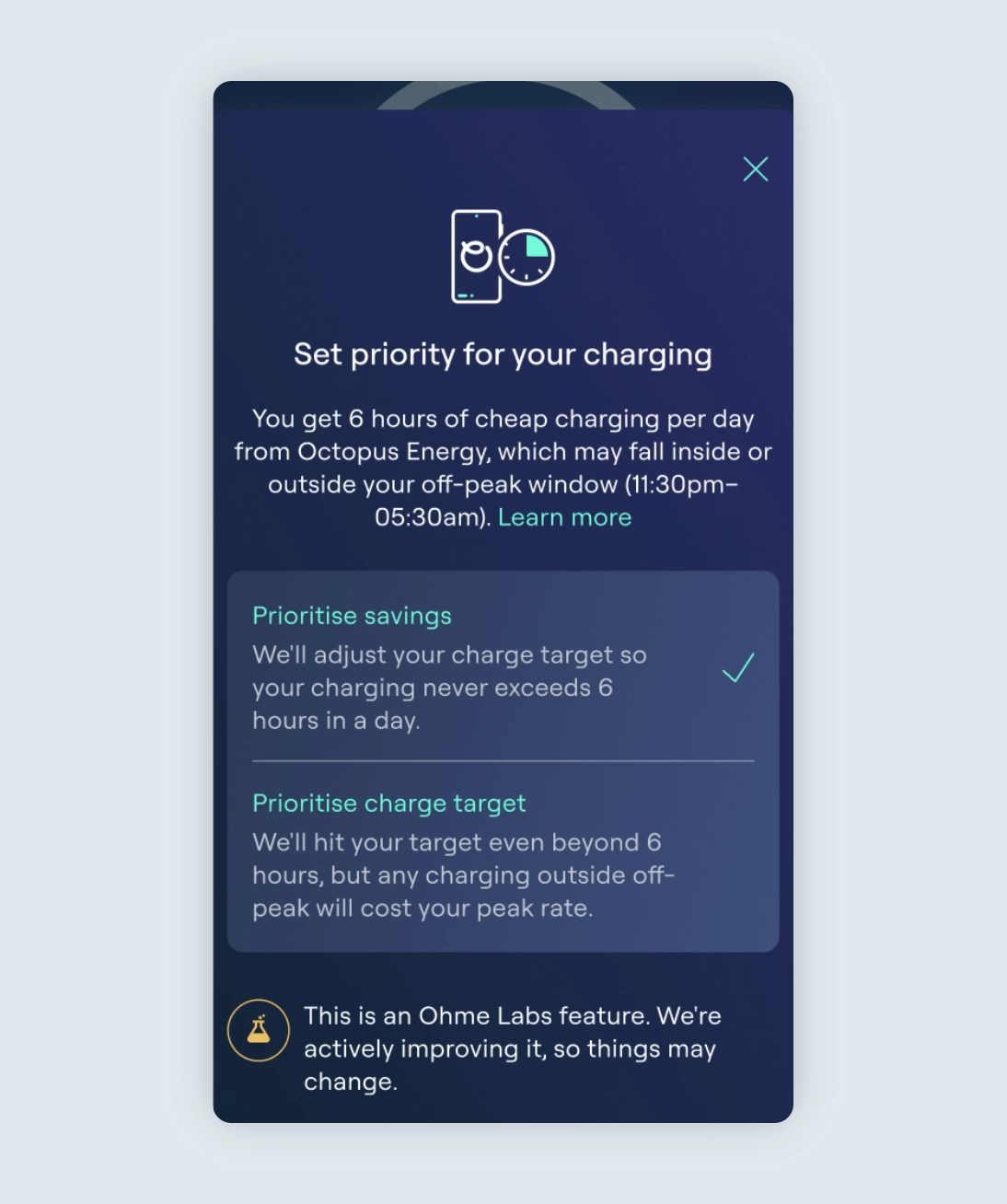
The 6-hour smart charging update is rolling out now.
Ohme and Octopus Energy are rolling out the new 6-hour smart charging update together. Everyone moved over to the new version of the tariff will have the ‘Prioritise’ setting available — if you haven’t seen it yet, it’s on its way.
Make sure you’re on the latest version of the Ohme app so you’re ready when it’s enabled for you. Your existing setup will continue to work as normal in the meantime.
If your account has been updated, you’ll see the new Prioritise toggle in the Ohme app on the Charging screen. To learn how to charge with Ohme using this new toggle see Prioritise savings or your target with Intelligent Octopus Go.
Octopus Energy has announced an upcoming changes Intelligent Octopus Go. Going forward, Intelligent Octopus Go will provide up to 6 hours of super-cheap smart charging every 24 hours for EV charging. For most drivers who plug in regularly and top up overnight, this change is unlikely to have much impact.
Ohme is preparing an app update to support this change and give you more control over how your charging is handled. This FAQ explains what’s changing, what to expect next, and how the upcoming Ohme app update will help you manage your charging once it’s available.
Jump to:
What is changing with Intelligent Octopus Go?
Does this affect my whole home electricity?
Will this change how much I pay?
Can smart charging happen outside 11:30pm–5:30am?
What happens if I need more than 6 hours of charging?
Do I need to do anything right now?
Will Ohme stop charging after 6 hours automatically?
What about Max charging?
Why did my charging slow down or pause?
I have more than one EV. What should I expect?
When will the Ohme app update be available?
Why can’t I see the new Intelligent Octopus Go setting in my Ohme app?
What is changing with Intelligent Octopus Go?
Octopus Energy is applying a limit of up to 6 hours of super cheap smart charging every 24 hours for EV charging on the Intelligent Octopus Go tariff.
Does this affect my whole home electricity?
No, the electricity you use for your home is separate.
You will still receive 6 hours of off-peak electricity for your whole home every day between 11:30pm and 5:30am.
The 6-hour limit only applies to smart charging for your EV.
Will this change how much I pay?
For most drivers, no.
If you plug in regularly and top up smaller amounts overnight, your charging will usually fit within the 6 hours of discounted smart charging.
You’re more likely to notice a difference if:
- You have a very large battery and plug in with very little charge remaining
- You need to fully recharge in a single night
- You have more than one EV charging on the same tariff
Can smart charging happen outside 11:30pm–5:30am?
Yes.
Your 6 hours of super cheap smart charging can be scheduled:
- During the 11:30pm–5:30am off-peak window
- Outside that window
- Or across a mix of both
Once your 6 discounted hours are used, any further smart charging will be billed at the peak rate, even if it happens overnight.
What happens if I need more than 6 hours of charging?
If you need more than 6 hours of charging, some charging may be billed at the peak rate.
Ohme is adding a new setting in the app that will let you choose how your charging is handled:
- You’ll be able to limit charging to stay within the 6 hours, or
- Prioritise reaching your charge target, even if that means some peak-rate charging
This setting will be available in an upcoming app update.
Do I need to do anything right now?
Not yet.
Ohme and Octopus Energy are rolling out the update together, and we’ll make sure everyone who has been moved over to the new version of Intelligent Octopus Go will have the new setting available in their app. When it’s ready, it’ll appear automatically — just make sure you’re on the latest version of the Ohme app so you’re ready for when it’s enabled for you.
You don’t need to take any action right now. We’ll update our Help Centre once the feature is live.
Will Ohme stop charging after 6 hours automatically?
Once the update is live, you’ll be able to choose.
If you choose to prioritise savings, Ohme will limit smart charging to 6 hours and stop charging after that.
If you choose to prioritise your charge target, Ohme may continue charging beyond 6 hours, with any additional charging billed at the peak rate.
What about Max charging?
Max charging is a manual override from Smart charging.
Max charging:
- Starts charging immediately at the fastest possible rate until your EV is full
- Does not use smart scheduling
- Is always billed at the peak or standard rate
- Starts if your charger is offline when you plug in to charge
This is true even if Max charging happens between 11:30pm and 5:30am.
Why did my charging slow down or pause?
This can happen for a few normal reasons:
- Your car may be limiting how fast it can charge
- Load Balancing may reduce charging to protect your home’s electrical supply
- Charging may pause if voltage levels are too high or too low
These safety features are built into all Ohme chargers and are expected behaviour.
I have more than one EV. What should I expect?
If you have multiple EVs charging on the same tariff, you may need to manage how you use the 6 discounted charging hours.
If you have more than one EV you could:
- Alternate charging nights between vehicles
- Plug in more frequently for smaller top-ups
This behaviour is expected and does not mean anything is wrong with your charger or tariff.
When will the Ohme app update be available?
The Ohme app update is now being rolled out gradually alongside Octopus Energy. The new setting will appear automatically in your app once it’s been enabled for you — you won’t need to manually update or reinstall anything. Just make sure you’re on the latest version of the Ohme app so you’re ready when it reaches you.
Once available, you’ll find the new setting in the Charging section of the app.
Why can’t I see the new Intelligent Octopus Go setting in my Ohme app?
Together with Octopus Energy, we’re rolling this feature out gradually, so it may not appear in your app straight away. The new setting will be enabled automatically — you won’t need to do anything. Make sure you’re on the latest version of the Ohme app so you’re ready when it reaches you.
Once it’s been enabled for you, you’ll see the new option in the Charging section of the app. In the meantime, your existing Intelligent Octopus Go setup will continue to work as normal.