
When adding an EV you will see a Pair your EV screen for all brands that offer the ability to log in with your car app account.
Once you have logged in the battery level will be displayed next to the car name in the top left of the Charging screen.


Close
Español (Argentina)
English (United Kingdom)
English (Australia)
Français (Belgique)
Nederlands (België)
Deutsch (Deutschland)
Español (España)
Français (France)
English (Ireland)
Italiano (Italia)
Nederlands (Nederland)
Português (Portugal)
This article applies to app version 2.14.2 and later
Jump to:
Getting the battery level from the EV
Setting your battery level when you plug in
Default values at the start
Smarter predictions over time
FAQs
There are two ways to add your EV to the Ohme app. For certain brands you will be able to log in with your car app account, this allows Ohme to communicate with the EV and get the battery level.
Knowing the battery level means you will be able to set the target you want Ohme to reach by the end of the session. The target can be changed and updated before or after plugin. Ohme will use the battery level from the EV and the target set to create the charge schedule.
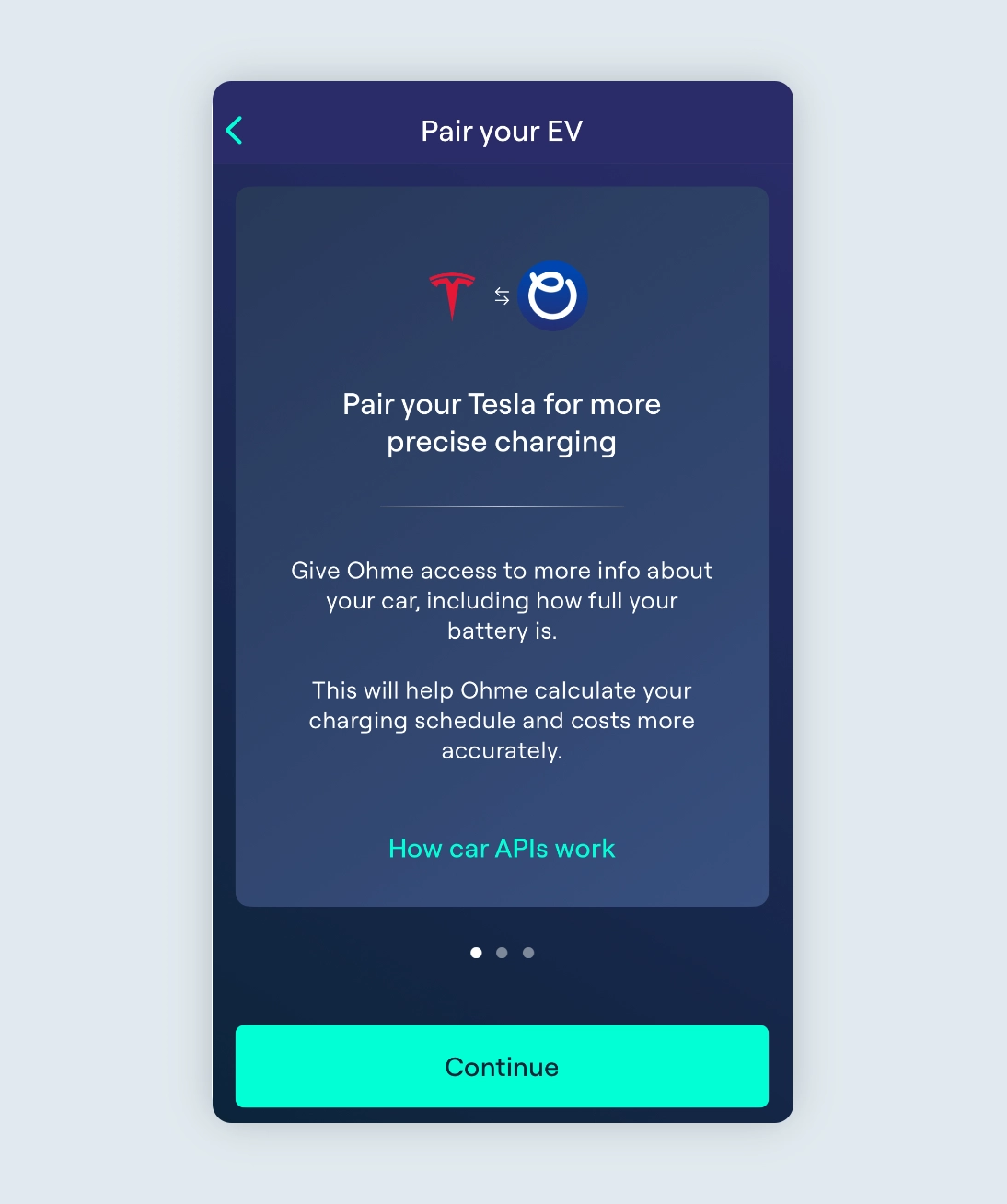
When adding an EV you will see a Pair your EV screen for all brands that offer the ability to log in with your car app account.
Once you have logged in the battery level will be displayed next to the car name in the top left of the Charging screen.
If Ohme isn’t able to get the battery level from the EV, when you plug in the Ohme app will prompt you to enter your current battery level. The battery level will usually be displayed on your car’s dashboard, infotainment display or your car app, then simply type it into the Ohme app.
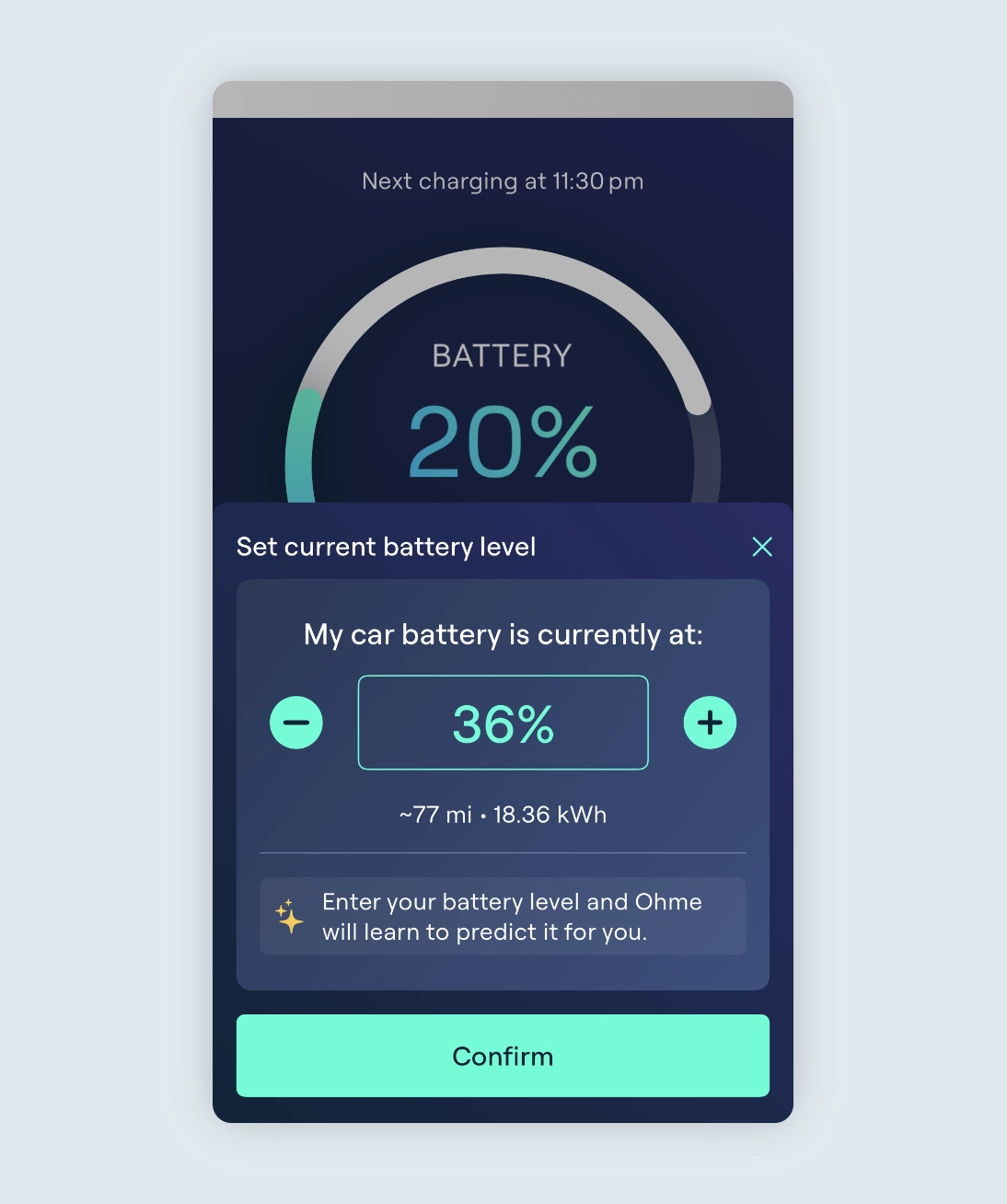
For example:
If your car is at 36%, you can use the plus and minus buttons to increase/decrease the battery level in increments of 5% or tap the number and type in 36.
Ohme will then know how much charge is needed to reach your target, and will schedule charging accordingly.

Previously non-API cars required a “Top up my car by” amount of charge to add to the EV. Ohme assumed your battery started empty, so you had to work out how much charge to add each time. That could change day to day depending on how much battery you had left.
Now, “Charge Target” replaces “Top up my car by”. Instead of trying to work out top-up amounts, you can set the battery level you want Ohme to reach. Ohme will start predicting your battery level and plan charging automatically. You might need to make small tweaks at first while it learns what your usual battery level is at the start of a charge, but it’ll soon become smarter and more accurate, making it easier and simpler to charge
If you don’t set your battery level after plugin Ohme will use the following default values:
The default values are there to ensure Ohme charges if the actual battery level has’t been set. You’ll be prompted to set your battery level at the start of every charge session after you plug in, to make sure charging is scheduled as accurately as possible.
At first, if you don’t enter a battery level, Ohme will rely on default settings to create your charge schedule.
Over time, as you enter your real battery level, Ohme will learn your habits and start predicting your usual state of charge. For example, if you typically plug in with around 30–35% remaining, Ohme will begin suggesting that value automatically. You can accept the prediction or adjust it if needed.
You’re always in control. If your actual battery level changes during a session, you can update it at any time and Ohme will adjust your charge plan instantly.
And for extra peace of mind, you can use the Ohme widget to keep an eye on your charge progress right from your home screen.
The reason Ohme isn’t able to see the battery level is due to how your car and charger communicate while charging.
AC vs DC charging
At home, your car converts AC power into DC before it goes into the battery.
Charging at home with Ohme
When you plug into your Ohme charger, your car’s onboard system controls the charging and converts the AC power into DC to charge your battery. Because of this, your charger can’t read the battery level directly from the car. That’s why the Ohme app might not always show how full your battery is.
Charging at public stations
Public DC chargers work differently. They send DC power straight to the battery, which allows much faster charging. These chargers use a system called CCS (Combined Charging System) via the two larger pins on the plug, that lets them read information from the car, such as:
Ohme uses your homes AC electricity, so the battery level cannot be read through the charging cable.
When you add your EV in the Ohme app, there are two ways it can work:
To give you more control, we’ve introduced a new way for you to set your battery level in the Ohme app. This helps Ohme understand how much charge you actually need, so it can schedule charging more accurately and show information that’s closer to your car’s real battery level, instead of assuming it’s empty each time you plug in.
To predict your battery level, Ohme uses:
From this data, Ohme can estimate your starting battery level by working backwards from your charging sessions.
It typically takes around 10 to 20 sessions before these estimates become accurate. This learning period applies to each unique user and vehicle combination, since driving and charging habits can vary significantly between cars.
If another EV is added to the app, Ohme will need a further 10 sessions before its predictions become reliable for that car profile.
Ohme’s smart charging predictions rely on learning your typical charging habits over time. If your routine changes significantly, such as charging at different times of day, on different days of the week, or for different durations, it can take another 10 to 20 sessions for the system to re-learn your new pattern and restore accuracy. Predictions also work best in households charging one or two vehicles. If more cars are connected and used irregularly, the data can become harder to interpret, which may temporarily reduce prediction accuracy.